
The Six Digits That Can Give Away Your WhatsApp Account
An attacker doesn't always need to steal or crack your password. WhatsApp's own Help Center and the FTC have both warned about a scam that only needs one thing from you: the six-digit registration code your own phone just received.
It usually starts with a text message that looks completely ordinary: a six-digit registration code, sent by WhatsApp itself, to confirm the phone is really yours. A minute later, a message arrives from someone who looks like a contact — a friend, a relative, a colleague — saying they're having trouble logging in and could really use that code you just received. It's urgent, they say. Just this once.
Nothing about that code is fake. It came from WhatsApp's real servers, to your real phone number, exactly as the app is designed to send it when someone tries to register or re-register that number. The only thing wrong with the moment is the second message — the one asking you to hand it over.
WhatsApp ties your account to your phone number, not to a separate username and password the way most other services do. To register or re-register the app on a device, WhatsApp sends a one-time six-digit registration code by SMS or voice call to that number — proof that whoever is setting up the account actually controls the phone. Type that code into the app, and registration completes on that device. It's a legitimate, ordinary part of how the app works every time someone sets up a new phone — and it's what most people mean when they informally call it a WhatsApp "OTP," though WhatsApp's own Help Center calls it a registration code, not an OTP, and this article uses that same term throughout.
That's exactly why it's dangerous in the wrong hands. The code isn't a password you chose and can change later — it's a live, time-limited key to finishing a registration that's already in progress. Anyone who has it, for the few minutes it's valid, can use it to register your number on their own device instead of yours.
One more distinction matters here, because it's easy to blur the two: the registration code is not the same thing as two-step verification. Two-step verification is a separate, optional protection WhatsApp offers on top of registration — when it's turned on, re-registering the number also requires a PIN you set yourself (and, optionally, a recovery email address), so a registration code alone is no longer enough to move the account. It's a genuinely additional layer, not a replacement for keeping the registration code private, and not something every account has turned on by default.
It's also worth stating plainly, because WhatsApp's own Help Center addresses this exact scenario directly: receiving a registration code you didn't request does not, by itself, prove your account is under attack. WhatsApp explains that this can also simply happen when someone else mistypes their own phone number while registering a new device — an ordinary mistake, not necessarily a targeted attempt at your account. The risk isn't the unrequested code arriving; it's what happens if you then act on a request to share it.
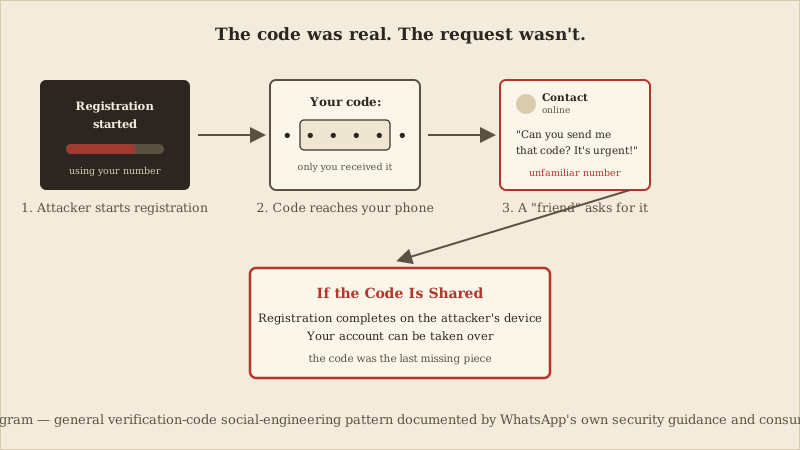
The attacker doesn't need your password, and in this scam they usually don't try to guess or steal one. Phone numbers are often public or easy to obtain — from a leaked contact list, a data breach, a social media profile, or simply by asking around. Armed with just your number, the attacker opens WhatsApp on their own device and starts the registration process using it. WhatsApp, following its normal and correct procedure, sends the six-digit registration code by SMS or call — to you, because it's your number. The attacker's registration attempt now sits one step short of completion. They don't have the code. You do.
This is the gap the scam is built to close. Immediately after the code arrives, a message reaches you — often from a WhatsApp account whose name and photo belong to someone you actually know. The attacker asks you to read out or forward the code, usually with a reason that sounds plausible and a little urgent: a login problem, a locked-out account, a request to "just confirm" something. If you send it, the attacker types it into their own device, registration completes there instead of on your phone, and your account moves under their control — often instantly logging you out of it in the process.
- The attacker starts WhatsApp registration using your phone number, on a device you don't control.
- WhatsApp sends the real six-digit registration code to your phone — the only device that can legitimately receive it.
- The attacker contacts you, often impersonating someone you know, and asks you to share that code.
- If you share it, the attacker completes registration on their device — and your session on your own phone typically ends.
The message asking for your code often looks like it comes from someone in your contacts — because in a meaningful share of cases, it does. Attackers frequently run this exact scam using a contact's account that has already been taken over the same way, one link in a chain. A message from a name and photo you recognize, in an app you already trust for everyday conversation, doesn't trigger the same suspicion a message from a stranger would. That borrowed trust is doing most of the persuading, not the content of the message itself.
It's worth being precise about what this scam needs and doesn't need, and why it's different from ordinary password theft. A stolen or guessed password is something an attacker can use entirely on their own, in private, at any time — no cooperation from the account owner required. A registration code is different: it requires the account owner's active participation, in the moment, which is exactly what the social engineering here is built to obtain. No code shared, no request acted on, no account transfer.
- A registration code arrives that you didn't request, especially if you weren't in the middle of setting up a new phone or reinstalling the app.
- A message — from a contact or a stranger — asks you to read out, forward, or screenshot a code you just received.
- The request carries urgency or a specific excuse: a locked account, a login problem, a favor that needs to happen "right now."
- The message comes from a contact whose usual tone, spelling, or way of writing suddenly feels slightly off.
The single most reliable protection is also the simplest: never share a WhatsApp registration code with anyone, for any reason, including someone who appears to be a contact and sounds like they urgently need help. WhatsApp's own support staff and any legitimate process will never ask you to read a code back to them — a request for the code is, by itself, close to a guarantee that something is wrong.
- Turn on two-step verification in WhatsApp's account settings — a separate, optional protection that adds a PIN required alongside registration, so a shared registration code alone is no longer enough to complete a takeover.
- Periodically check your account's linked devices in WhatsApp's settings, and sign out of anything you don't recognize.
- Use a unique, non-reused password for the email address linked to your account, since email access is often the fallback route into other accounts once one has been compromised.
General Guidance
CyberBlink Golden Rule: a registration code that reaches your phone proves your phone number is yours — nothing more. The moment anyone, however familiar, asks you to hand that code to them, treat the request itself as the attack.
If you've already shared a code and suspect your account has been taken over, speed matters more than anything else. Reinstall WhatsApp on your own phone and go through registration again with your own number — this typically sends a fresh code and can end the attacker's active session, since only one device can hold a registered session for a number at a time. If you have two-step verification enabled, you'll also need your PIN to complete this. WhatsApp's Help Center provides an in-app path to report a stolen or compromised account if you're locked out entirely.
- Reinstall WhatsApp and re-register your own number as soon as you notice the compromise, to reclaim the active session.
- Warn the contacts most likely to be messaged from your account before you regain control, since attackers frequently reuse the same code-request scam against the victim's own contact list.
- Check the email address and password tied to your WhatsApp account and any linked services — if you reuse that password elsewhere, change it everywhere it appears, not just on WhatsApp.
- WhatsApp (Meta) Help Center — "About registration and two-step verification," faq.whatsapp.com/506595211487528 (official platform guidance)
- WhatsApp (Meta) Help Center — "Received verification code without requesting it," faq.whatsapp.com/479314433984258 (official platform guidance)
- WhatsApp (Meta) Help Center — "How to recover a compromised account," faq.whatsapp.com/1131652977717250 (official platform guidance)
- Federal Trade Commission — "The Google Voice scam: How this verification code scam works and how to avoid it," consumer.ftc.gov, October 2021 (a Google Voice verification-code scam example, cited only to establish the broader verification-code social-engineering pattern — not a WhatsApp-specific case)
A necessary caveat
This describes a documented pattern — confirmed by WhatsApp's own Help Center and the FTC — not one named victim, consistent with how both describe it. No third-party loss or report-count statistic is used: an earlier draft's UK regulator figures and press citation were removed because they couldn't be verbatim-verified here. Editors should reconfirm the WhatsApp Help Center URLs against the live pages before publication.
Receiving an unexpected registration code doesn't by itself mean your account is compromised — WhatsApp's own Help Center notes it can also happen when someone mistypes your number registering their own device. The real risk is only in what happens next: whether that code gets shared.
What this scam is not
The Takeaways
Never share a WhatsApp registration code with anyone, no matter who they claim to be or how urgent the request sounds — treat any request for it as a scam by default.
Turn on two-step verification in WhatsApp's settings — a separate, optional protection — so a shared registration code alone can no longer complete an account takeover.
If you ever do share a code by mistake, immediately reinstall and re-register WhatsApp with your own number, and check your account's linked devices and email security right away.
If you would like a visual explanation, continue with the accompanying CyberBlink video.
Never Send This WhatsApp Code
A short visual walkthrough of how a scammer can turn a real WhatsApp registration code against its owner, without ever needing to guess or steal a password. This CKC article covers only the sourced facts above; any illustrative elements in the companion video are not a substitute for them.