
Stop Using Just a Password — Here's What's Next
The password was never meant to carry this much responsibility alone. Here is what the industry is actually replacing it with, and why the replacement is harder to steal.
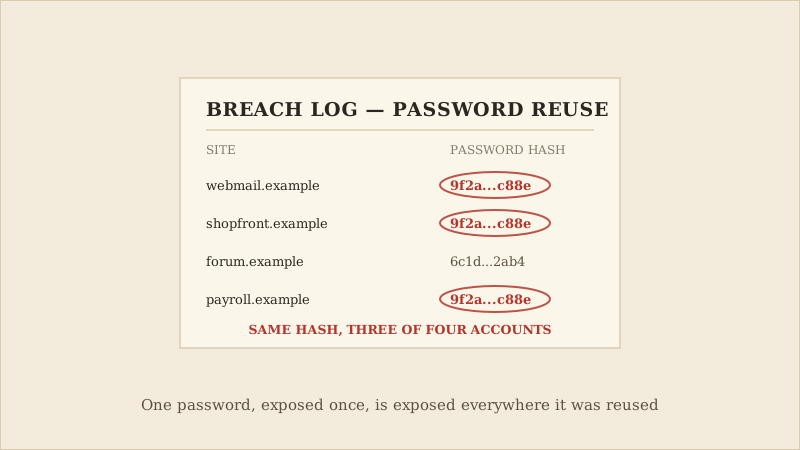
Open a password manager and search for how many accounts share the exact same password. Most people who try this stop counting somewhere past ten. Every one of those accounts is only as secure as the single weakest place that password has ever been typed — and there is no way to know which place that is until after it has already been breached.
That fragility is not a personal failing. It is built into the design: a password is one secret that has to be created, remembered, typed, and stored correctly every time, by both you and every service you have ever handed it to. Get any one of those steps wrong, anywhere, once, and the secret stops being secret. That is the quiet motivation behind one of the more significant shifts in everyday security over the past few years: a coordinated industry move toward something that cannot be phished, reused, or guessed the same way.
Here is what actually changed, mechanically. A passkey works differently from a password at a fundamental level. Instead of a single secret that both you and the website both need to know, your device generates a matched pair of cryptographic keys when you set up a passkey for a site: one private key that stays under the control of your device or passkey provider, and one public key that the website stores. Depending on how you have it set up, that private key may sync across your own devices through a passkey provider — your phone's or computer's built-in credential manager, for example — but it is never disclosed to the website itself, at setup or at sign-in. When you sign in, the website asks your device to prove it holds the private key, which it does using your fingerprint, face, or device screen lock — nothing is ever typed, and nothing that could be typed is ever transmitted or stored by the website.
This is a deliberate design choice, not just a convenience feature. Because a passkey is cryptographically tied to the exact website it was created for, it simply will not work on a fake or look-alike version of that site, even a highly convincing one. There is nothing to type into the wrong page, because there is nothing to type at all.
None of this is theoretical — it maps directly onto how password breaches actually happen. Nearly every major password-related incident traces back to the same underlying weakness: a secret that exists in more than one place — in your memory, on the company's servers, sometimes in a browser's saved-password list, occasionally in a breach dump traded on criminal forums. Every one of those copies is a chance for it to leak. Passkeys remove almost all of those copies. There is no password sitting in a company's database for a breach to expose, and no shared secret for a phishing page to capture, because the private half of a passkey stays under the control of your device or passkey provider and is never disclosed to a website or a phishing page in the first place.
This does not mean passwords disappear overnight — most services still support them as a fallback, and passkeys need to be set up individually per device or synced through an account. But the direction is set: three competitors agreed on a shared standard specifically because passwords, no matter how carefully chosen, cannot fully solve a problem that is built into how they work.
None of this requires waiting for passwords to disappear. Most major platforms already let you add a passkey today, alongside the password you already have.
- Add a passkey to your email account first — every other account's password reset depends on it.
- Anywhere a passkey is not yet available, use a password manager and turn on multi-factor authentication instead of relying on memory.
- Treat any unexpected request to type your password as worth a second look — a passkey would have simply refused to work there.
None of this is an all-or-nothing switch, and a passkey cannot protect an account you never enable it for. But it is the first authentication upgrade in years that removes the weak point instead of asking you to manage it more carefully — worth the few minutes it takes, starting with the accounts that would hurt the most to lose.
A common misconception
A passkey is not just "a password stored for you." It is a different mechanism entirely — no secret is ever transmitted at sign-in, which is what makes it resistant to phishing in a way a saved password never can be.
The Takeaways
Turn on a passkey for your email account before anything else — it is the account every other password reset relies on.
Pair a password manager with multi-factor authentication for any account that does not support passkeys yet.
If a site unexpectedly asks for your password somewhere new, stop and check the address before typing anything.
If you would like a visual explanation, continue with the accompanying CyberBlink video.
Stop Using Just a Password — Here's What's Next
A practical look at passkeys: how they work, why they resist phishing in a way passwords cannot, and how to turn them on today.