
How Hackers Steal Passwords Without You Clicking Anything
Not every password theft starts with a suspicious link. A 2024 wave of corporate breaches shows how malware already sitting on a device can hand over saved passwords without a single click at the moment of theft.
Most advice about password theft focuses on a single moment: the suspicious link, the fake login page, the email that asks you to click. That advice is not wrong, but it describes only part of the picture. A large and growing share of stolen passwords are never typed into a fake page at all. They are quietly copied from where they were already saved, by software that was installed on the device long before the theft itself happens.
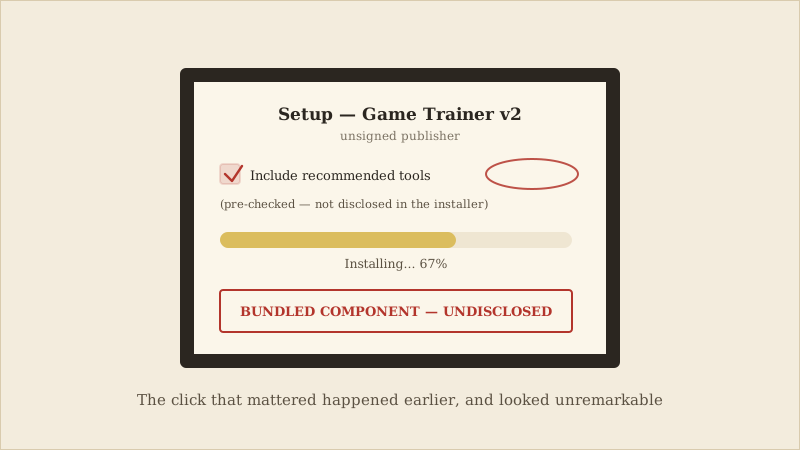
This type of malware is often called an infostealer, and it does not need you to do anything at the moment it collects your passwords — only earlier, when the malware first found its way onto your device, frequently bundled with pirated software, a cracked game, or a malicious ad.
Infostealer malware works by quietly reading information that is already stored on an infected device: passwords saved in a browser, authentication tokens kept in a session, and sometimes autofill data like names and card numbers. Once collected, this information is bundled into a file — often called a "log" — and either sold in bulk on criminal marketplaces or used directly. None of this requires the victim to click a phishing link at the moment of theft. The only click that mattered, if there was one, happened earlier and looked unremarkable: installing a program from an untrusted source.
In the incidents linked to Snowflake customer accounts, attackers did not need to defeat Snowflake's own security. They simply used passwords that were already sitting, valid and unused by their rightful owner's knowledge, inside logs harvested from infected devices — sometimes long before the credentials were ever tried against a real account.
These harvested credential logs are frequently traded in bulk on criminal marketplaces, sometimes for a small price per log, precisely because collection is automated and happens at scale. A single log from one infected device can contain saved passwords for dozens of different websites and services at once, which is part of why buyers on these marketplaces can search for logs tied to a specific company or type of account.
That gap between infection and use is exactly why this kind of theft is easy to overlook — it does not feel like an attack from the victim's side. There is no suspicious email to remember, no fake page to recall clicking through. The password simply stops being private, quietly, at some point after the malware was installed — and it may not be used until weeks or months later, which makes it much harder to trace the theft back to its source.
It also means that a password can be compromised even on a device the owner considers reasonably careful about email and links, because the entry point was a different kind of download entirely. This is part of why relying on a password alone, no matter how strong or how carefully chosen, leaves a real gap: a strong password stored in a browser is just as readable to infostealer malware as a weak one.
There is no single fix here, because a password manager alone does not solve this problem — if malware is already running on a device, it can potentially read whatever that device has access to, manager included. The realistic defense is layered: keep the malware off the device in the first place, and make sure that any one stolen credential still isn't enough to get in.
- Get software only from official app stores or a publisher's own site — pirated software, cracked games, and unofficial browser extensions remain among the most common ways infostealer malware reaches a device.
- Use a reputable password manager with a unique password for every account, and add phishing-resistant multi-factor authentication — an authenticator app, hardware key, or passkey — wherever it's offered.
- Keep your operating system, browser, and security software patched and up to date, since most infostealers rely on known weaknesses that a timely update closes.
None of this requires becoming an expert at spotting malicious downloads. It requires making the entry point harder to reach and making sure that if a password is ever silently harvested anyway, it isn't enough on its own to get in.
A memorable observation
The Snowflake-linked incidents were not a failure of Snowflake's own defenses — they were a demonstration that a strong system can still be entered through a weak, unrelated door: an employee's own infected device.
The Takeaways
Check whether your email shows up in a known breach or credential-exposure lookup, and change any reused passwords immediately if it does.
If a device starts behaving oddly or you find software you don't remember installing, run a full security scan before trusting any saved credentials on it again.
Turn on sign-in alerts or new-device notifications wherever they're available, so a credential being used somewhere unexpected doesn't go unnoticed.
If you would like a visual explanation, continue with the accompanying CyberBlink video.
How Hackers Steal Passwords Without You Clicking Anything
Inside infostealer malware: how it silently harvests saved passwords, and why the danger starts long before any suspicious link.