The Pipeline Shutdown That Started With One Password
In May 2021, a criminal gang shut down the pipeline supplying nearly half the fuel used on the U.S. East Coast — and investigators believe they got in through a single password that was never supposed to still work.
For five days in May 2021, drivers across the southeastern United States found gas stations with bags taped over the pump handles. Prices spiked, lines formed before dawn, and in a few places people filled plastic bags with gasoline out of sheer panic. None of it was caused by a storm, a refinery fire, or an actual shortage of oil. It started with one password.
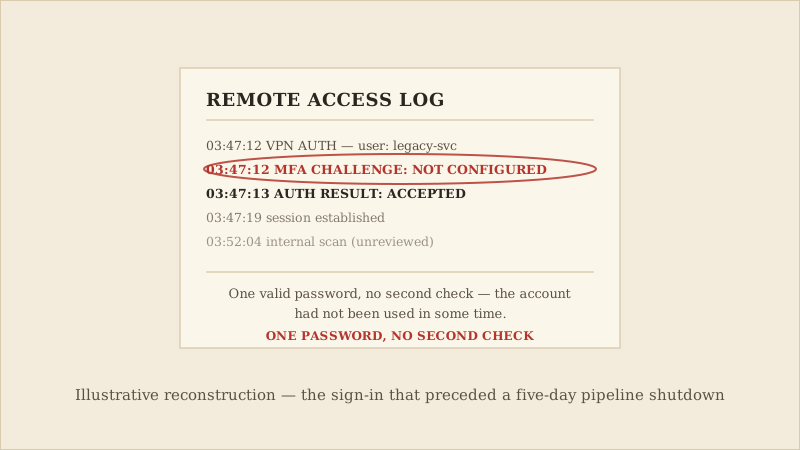
That password belonged to a Virtual Private Network account at Colonial Pipeline, the company operating the pipeline that carries roughly 45% of the fuel used on the East Coast. The account was old, no longer in active daily use, and — like a large share of accounts everywhere — had never been set up with a second layer of verification beyond that single password. On May 7, 2021, someone signed in with it.
The pipeline itself was never hacked directly — Colonial shut it down on its own, as a precaution, while it worked out how far the intrusion into its business network had spread. The actual break-in happened somewhere much smaller and much less dramatic: one valid VPN login, accepted without a second check.
That pattern has appeared repeatedly in ransomware intrusions, not just this one. Attackers rarely need to defeat strong security. They need one account that was set up before multi-factor authentication was standard practice, or one employee whose saved password shows up in a leaked-credential database, or one remote-access tool nobody remembered to retire. Once inside, ransomware groups like DarkSide typically spend time moving through a network quietly before encrypting anything — mapping what they can reach, identifying backups to disable, and choosing the moment that causes the most damage.
This case matters beyond Colonial Pipeline because of what it demonstrated: a ransomware attack does not have to touch a hospital, a school, or a personal computer to reach ordinary people. It only has to touch something enough people depend on.
The shutdown itself lasted about five days, but the disruption it caused — panic buying, station closures, price spikes across multiple states — outlasted the outage, because public reaction to a fuel shortage moves faster than a pipeline can restart. It became one of the clearest public demonstrations that ransomware isn't only a data-theft problem or an IT-department problem. When it hits the right kind of target, its consequences show up as an empty pump at a gas station, not just a locked file on a server.
It's also worth being honest about what is and isn't confirmed here. The pipeline shutdown, the ransom amount, and the DOJ's recovery are all matters of public record. Exactly how the attackers first obtained that VPN password is not — it is investigators' best account of events, based on the available evidence, not a proven fact. That gap is itself a reminder that even the company at the center of its own worst day couldn't fully reconstruct how it started.
None of the defenses that would have mattered here are exotic or expensive. They're the same basics that come up in almost every account-compromise story, because they work against almost every account-compromise story.
- Turn on multi-factor authentication for anything you connect to remotely — a VPN, a work account, a router or camera's admin panel — not only the accounts that feel important.
- Retire accounts and access methods you no longer use; a forgotten login is exactly the kind of account attackers look for.
- Keep an offline or otherwise disconnected backup of anything you can't afford to lose — a backup a ransomware attacker can also reach and encrypt doesn't count as a backup.
No single control can eliminate ransomware risk completely. What these habits change is the odds, and how bad the worst case ends up being once a single password is no longer enough by itself to get anyone anywhere.
A necessary caveat
The most commonly repeated detail of this case — that the password came from an earlier, unrelated leak — is the one part investigators were never able to fully confirm. Treat it as the working theory it was, not an established fact. That doesn't change the two things that are confirmed: no second verification step existed, and that alone was reportedly enough.
The Takeaways
Enable multi-factor authentication on every remote-access account you have, personal or work — VPNs, routers, and admin panels included, not only email and banking.
Delete or disable old accounts and access methods you no longer use, rather than leaving them dormant and unmonitored.
Keep at least one backup of anything irreplaceable somewhere a ransomware infection on your main devices can't reach it.
If you would like a visual explanation, continue with the accompanying CyberBlink video.
Ransomware Doesn't Hack You. It Waits For You To Slip.
How one dormant VPN account without multi-factor authentication led to a five-day pipeline shutdown — and the real-world fuel shortage that followed.