
Sold, Collected, Unpaid: Inside the Fake Marketplace Payment Scam
A buyer shows a payment confirmation on their own phone. The seller's own bank account tells a different story. Singapore Police have documented hundreds of victims of exactly this fake-buyer pattern, and Meta's own Marketplace guidance describes the same gap this scam is built to exploit.
A seller lists something worth having — a phone, a laptop, a watch. A buyer messages quickly, agrees to the asking price without haggling, and wants to move fast. Minutes later, a screenshot arrives: a payment confirmation, a bank transfer receipt, a "funds sent" notice from a payment app. It looks convincing. The buyer is already asking when they can collect.
The seller checks their own account. Nothing has arrived. Not yet, they assume — bank transfers can take a moment to show up. The buyer is waiting outside, or a courier is on the way, and the pressure to just hand the item over is immediate. Whatever image the seller was shown, it was never a payment. It was a picture of one.
General Guidance
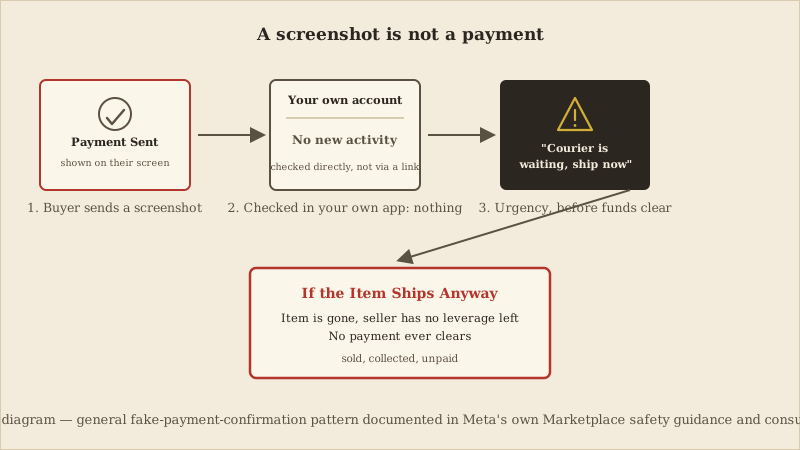
The scene above illustrates a related but statistically separate pattern, documented directly in Meta's own Facebook Marketplace and Messenger safety guidance: a buyer sending a screenshot or fake payment-app email as fabricated proof that money has already moved, to pressure a seller into shipping or handing over an item before checking their own account. Meta's guidance instructs sellers to confirm payment in their own account rather than trust a screenshot or message. This screenshot pattern is real and independently documented by Meta, but the Singapore Police Force victim and loss figures above describe the phishing-link credential-theft variant specifically, not this scenario.
The police-documented version of this scam is a credential-theft attack wearing a marketplace disguise. A fake buyer agrees to purchase an item, then follows up with a message — often styled to look like it comes from the marketplace itself, or from a delivery or payment service — under the pretext that the seller needs to click a link or scan a QR code to "receive" the payment. That link or code leads to a spoofed bank or delivery-service website, built to look like the real thing. A seller who enters their online banking login, card details, or a one-time password there hands those directly to the scammer, who uses them to move money out of the seller's own account — a very different, and more severe, outcome than simply not getting paid for the item.
A related but distinct pattern, documented separately in Meta's own Marketplace and Messenger safety guidance, doesn't need a phishing link at all: a screenshot of a "payment sent" or "transfer complete" screen, or a fraudulent email styled to look like it comes from a payment provider or bank, is presented as proof that money has already moved. It can be produced in minutes with an edited image, a look-alike app, or a plain image-editing tool, and requires no hacking and no special skill — just a picture convincing enough to be believed at a glance, at exactly the moment a seller is deciding whether to hand something over. Both variants — the phishing link and the fabricated screenshot — rely on the same underlying gap: the seller trusting something the buyer sent instead of checking their own account or bank directly.
- A fake buyer contacts a seller about a listed item and agrees to the price quickly, often without negotiating.
- A fraudulent order, payment, or delivery message follows — either a phishing link or QR code, or a screenshot/email claiming payment has already been sent.
- If it's a phishing link or QR code, it leads to a spoofed bank or delivery-service site designed to capture banking credentials, card details, and a one-time password.
- The seller applies pressure at the same time: a courier waiting, a pickup time approaching, a deadline on the deal — and either loses the item without payment, or has their own account accessed using the credentials just entered.
This isn't a new pattern. A February 2024 Singapore Police anti-scam enforcement operation reported that 38 people were under investigation over a near-identical fake-buyer phishing scheme on Facebook and Carousell, with at least 419 victims and losses of at least S$1.8 million recorded since January of that year alone — the same mechanism as the 2025 advisory above: a fake buyer, a link or QR code sent under the pretext of payment, and a spoofed site built to capture banking credentials.
The scam is built around a single substitution: it replaces the seller's own source of truth about whether they've been paid with the buyer's claim about it. A legitimate payment is confirmed by checking your own bank or payment app directly — nothing a buyer shows you, sends you, or tells you is evidence of that on its own, however official it looks. Once a seller accepts the buyer's word, or the buyer's screenshot, as if it were their own bank statement, the transaction is already compromised.
Urgency does the rest. A courier waiting outside, a pickup slot about to expire, or a buyer who suddenly seems ready to walk away all create pressure to act before double-checking — and checking a bank balance takes only a few seconds longer than not checking it. Sellers eager to complete a sale, especially for a high-value item they're glad to finally be rid of, are often willing to accept a small amount of ambiguity ("it's probably just a delay") rather than risk losing a buyer who seems ready to pay. That willingness is exactly what the fabricated evidence is designed to produce.
This kind of fraud sits inside a much larger category of online crime. In the United States, the FBI's Internet Crime Complaint Center (IC3) recorded 56,478 Non-Payment/Non-Delivery complaints in 2025 alone — a category that covers online transactions generally, not specifically Facebook Marketplace, seller fake-payment scams, or any single platform. That figure is cited here only as broader context for how common non-payment and non-delivery fraud is across online commerce as a whole, not as a count of the specific fake-buyer pattern this article describes.
- A buyer sends a screenshot, email, or message as proof of payment instead of the payment simply appearing in your own account.
- Any claim that a payment is "pending," "on hold," or "needs to be released" — especially if releasing it supposedly requires you to pay a fee, provide a code, or click a link.
- Pressure to ship, hand over the item, or meet immediately, arriving at the same time as the supposed payment proof.
- A request to use a link or scan a QR code to "receive" the payment, rather than simply checking your own banking or payment app.
- A buyer who agrees to the asking price unusually quickly, with little or no negotiation.
- Before handing over anything, open your own banking or payment app directly — never through a link or QR code the buyer sent — and confirm the funds have actually cleared.
- If you're pressured before you can verify, pause the transaction rather than the verification; a genuine buyer can wait for you to check your own account.
- If you already shipped or handed over an item without confirmed payment, preserve evidence immediately: the buyer's profile, the full chat history, the listing itself, any phone number or email address used, and — for electronics — the item's serial number or IMEI if you recorded one before handover.
The core defense is a single habit: your own account, checked directly, is the only proof of payment that counts. A screenshot, an email, or a buyer's confident tone are not evidence — they're simply easy to produce.
- Confirm payment only by checking your own banking or payment app directly, never by clicking a link or scanning a QR code a buyer provides.
- For higher-value items, prefer meeting in person and confirming a payment method that settles immediately and visibly in your own account, or use the marketplace's own in-app checkout and shipping protections where they're offered.
- Never send a code, PIN, or password to a buyer under any pretext — a real payment does not require the seller to "verify" or "unlock" anything on their end.
- If you're scammed, report the buyer and the listing activity to the platform, contact your bank or payment provider immediately if any credentials, card details, or a one-time password were entered anywhere, and file a report with your national fraud-reporting service — for example, the police in Singapore, or the FBI's IC3 at ic3.gov in the United States.
General Guidance
CyberBlink Golden Rule: the buyer must never become your source of truth about whether you've been paid. A screenshot, an email, or a promise is not a payment — only your own account, checked directly, is.
- Singapore Police Force — "Police Advisory on Phishing Scams Involving Fake Buyers on Online Marketplaces," police.gov.sg, February 12, 2025 (primary law-enforcement advisory)
- Singapore Police Force — "38 Persons Investigated For Their Suspected Involvement In Fake Buyer Phishing Scams In Anti-Scam Enforcement Operation," police.gov.sg, February 21, 2024 (supporting historical enforcement report)
- Meta (Facebook/Messenger) Help Center — "About scams on Facebook Marketplace" and Marketplace trust-and-safety guidance, facebook.com/help and messenger.com/help (official platform guidance)
- Federal Bureau of Investigation, Internet Crime Complaint Center (IC3) — 2025 Internet Crime Report, ic3.gov (broader U.S. internet-fraud context only, not Marketplace-specific)
- Federal Trade Commission — online shopping and payment-scam consumer guidance, consumer.ftc.gov; report fraud at reportfraud.ftc.gov
A necessary caveat
Primary evidence: the SPF's February 2025 advisory (at least 189 victims, at least S$303,000 lost since January 2025) and its February 2024 enforcement report (38 investigated, at least 419 victims, at least S$1.8M lost) — both police advisories describing a recurring pattern, not one named victim. The FBI's IC3 figure is broader U.S. context only, not a count of this scam. BBB Scam Tracker figures were removed on review as unverifiable here. Editors should reconfirm every URL and figure before publication.
General safety practice for verifying payment before releasing goods — not financial or legal advice, and not exhaustive across every payment method, marketplace, or jurisdiction. Consult your platform's own buyer-protection and payment-dispute policies directly.
Scope of this guidance
The Takeaways
Confirm any payment by checking your own banking or payment app directly — never through a screenshot, email, link, or QR code a buyer sends you.
Treat pressure to ship or hand over an item before payment clears as a warning sign in itself, not a reason to move faster.
If you're scammed, preserve the buyer's profile, chat history, and the listing, then report it to the platform and your national fraud-reporting service.
If you would like a visual explanation, continue with the accompanying CyberBlink video.
Facebook Marketplace: The Payment That Never Arrived
A short visual walkthrough of the fake-payment-confirmation pattern documented in this article. This CKC article covers only the sourced facts above; any illustrative elements in the companion video are not a substitute for them.