
Session Hijacking: The Attack That Skips Your Password Entirely
In March 2023, attackers took over Linus Media Group's YouTube channels without ever needing the password or a new MFA code. They reused a session that was already logged in — a pattern Google has tracked against creators since 2019.
Most advice about account takeovers assumes an attacker needs your password, and ideally a way around your multi-factor authentication too. Sometimes neither is true. An attacker who gets hold of an already-signed-in session can walk straight past the login screen, because as far as the service is concerned, that session already proved who you are.
When you log into a service like YouTube, you typically prove your identity once — with a password, and often a second factor like an authenticator app or security key. If that succeeds, the service doesn't make you repeat the whole process on every click. Instead, it issues your browser a session: a small piece of data, usually stored as a cookie, that says "this browser already proved who it is, let it through." Every request your browser makes afterward carries that session data instead of your password.
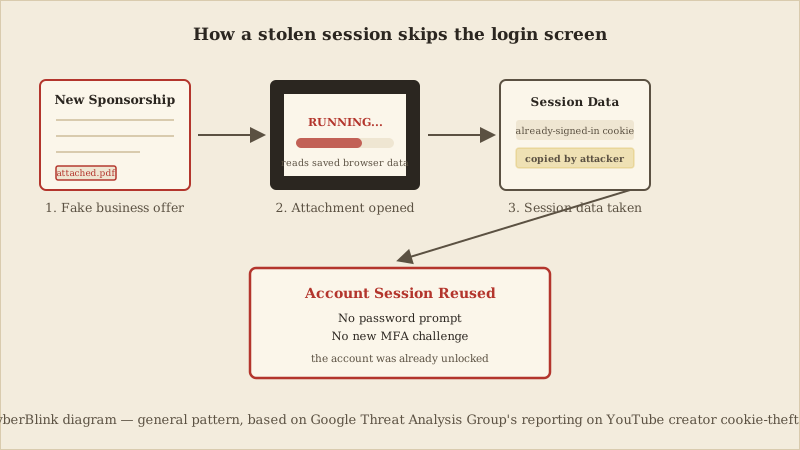
That convenience is also the weak point session-hijacking attacks target. If an attacker can copy a valid session cookie off a device — rather than guess or steal the password itself — they can load it into their own browser and be treated as though they had logged in normally. In the Linus Media Group case, the malicious attachment reportedly did exactly that: it pulled authenticated session data out of the browser already signed into the affected Google accounts, and the attackers used it directly.
A hotel keycard is a useful way to picture this. Checking in at the front desk — showing ID, paying — is the login. The keycard you're handed afterward is the session: the door lock doesn't re-check your ID on every entry, it just reads whatever card is presented. If someone copies that card, the lock opens for them too, without ever asking who they are. The front desk did its job correctly; the card just changed hands.
Not every cookie a browser holds is this sensitive. Most websites also set advertising and consent cookies, which remember preferences like language settings or whether you dismissed a cookie-notice banner — losing one of those is a non-event. Authentication session cookies are different: they are effectively bearer credentials for a signed-in account, which is why security teams treat them with the same care as a password, and why stealing one can substitute for a full login.
This is also why it's inaccurate to describe the Linus Media Group incident as MFA being "cracked" or "bypassed" in any cryptographic sense. Nothing about the second factor itself was broken. The attackers simply never reached the point where MFA would have been asked for again, because the stolen session data let them skip past the authentication step entirely — the same way a copied keycard skips the front desk, not the lock's electronics.
A few signs are worth investigating if you suspect something similar has happened to an account you manage: sign-in alerts or device notifications you don't recognize, account or channel details changing without your action, or being logged out of a session you didn't end yourself. None of these guarantee a session was hijacked, but each is a reasonable prompt to check your account's active sessions and connected devices.
Changing the password may not be sufficient by itself. Session invalidation behaviour varies by service — some end every existing session the moment a password changes, others don't — so explicitly review and revoke active sessions rather than assuming a password change alone closes the door. If the device that was compromised is still infected, whatever new session you create on it can be exposed again, so recovery should preferably start from a separate, trusted, and updated device.
- Verify an unexpected sponsorship or business offer through an independently located official channel before opening any attachment, rather than replying to the email itself.
- From a trusted device, change the password and explicitly review and revoke active sessions and signed-in devices, instead of assuming a new password alone ends every existing session.
- Remove the source of compromise: update, scan, and review the browser, extensions, and any recently installed software on the device the session was taken from.
A newer layer of defense is starting to close this gap at the browser level. Chrome's Device Bound Session Credentials work ties a session to the specific device it was issued on, so a copied session cookie is far less useful on a different machine — the equivalent of a keycard that only works in the hand that first picked it up. It's a meaningful improvement, not a guarantee, and it's still rolling out rather than universally available today.
General Guidance
CyberBlink Golden Rule: a login screen you never see isn't proof nothing happened — it can mean an attacker didn't need to see it either. Review your account's active sessions the same way you'd review your passwords.
- Google Threat Analysis Group — "Phishing campaign targets YouTube creators with cookie theft malware," blog.google/threat-analysis-group (primary threat report)
- The Verge — "How hackers took over Linus Tech Tips," March 24, 2023
- Google Account Help — "See devices with account access," support.google.com/accounts/answer/3067630
- YouTube Help — "Recover a hacked YouTube channel," support.google.com/youtube/answer/76187
- Chrome for Developers — "Device Bound Session Credentials now available on Windows," developer.chrome.com/blog/dbsc-windows-announcement
A necessary caveat
Publicly available reporting confirms the mechanism (a malicious attachment exposing session data, later reused by the attackers) and the outcome (renamed channels broadcasting crypto-scam livestreams), but does not establish exact malware behaviour, internal Linus Media Group findings, financial-loss figures, or a recovery timeline. This article does not speculate beyond what The Verge and Google's Threat Analysis Group have documented.
The Takeaways
Review your Google Account's active devices and sessions periodically, not just after something looks wrong, and sign out of anything you don't recognize.
Treat unexpected sponsorship or collaboration offers with attachments as a reason to verify the sender through a channel you found independently, before opening anything.
If you manage a channel or shared account, keep the number of devices and browser profiles with standing access as small as practical.
Companion Video
If you would like a visual explanation, continue with the accompanying CyberBlink video.
Hackers Don't Always Need Your Password
A short visual walkthrough of how a stolen browser session can let an attacker into an account without a password or a new MFA prompt. This CKC article covers only the sourced facts above; any illustrative elements in the companion video are not a substitute for them.